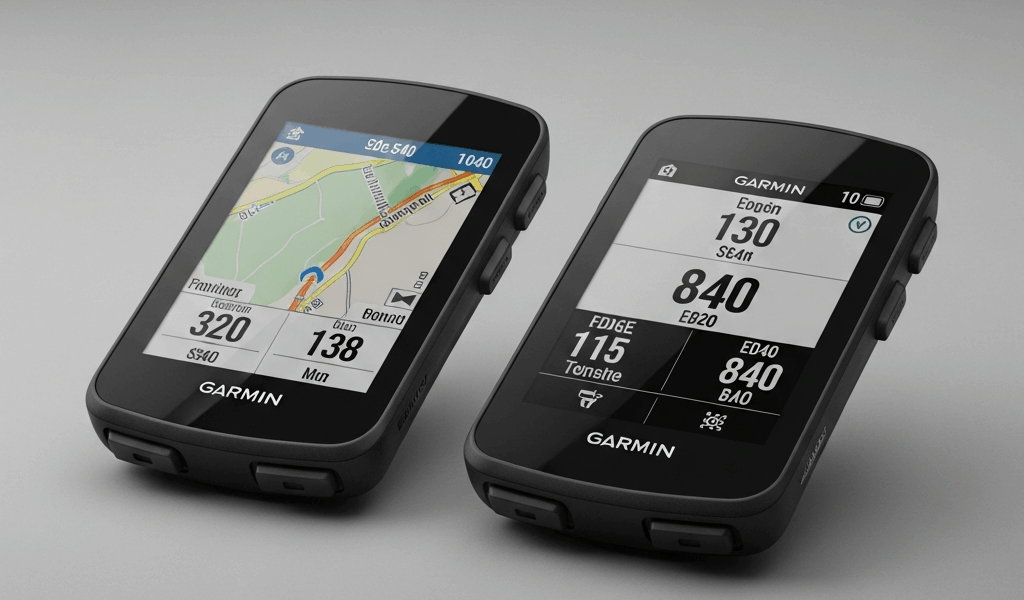
Garmin Edge 540 vs 840 — Quick Specs Comparison
Picking between the Garmin Edge 540 and 840 has gotten complicated with all the spec-sheet noise flying around. As someone who bought both units within six weeks of each other and rode them on identical routes, I learned everything there is to know about these two computers — the hard way. Roughly 800 miles split across road rides, gravel, and a three-day bikepacking trip through the Ozarks. Real notes. Real money spent. Here’s where I landed.
First, the side-by-side. Numbers won’t settle this debate entirely, but they’ll frame it.
This article includes affiliate links. We may earn a commission at no extra cost to you.
| Feature | Garmin Edge 540 | Garmin Edge 840 |
|---|---|---|
| Retail Price (Standard) | $349.99 | $499.99 |
| Screen Size | 2.6 inches | 2.6 inches |
| Touchscreen | No | Yes |
| Battery Life | 26 hours | 42 hours |
| Solar Charging Option | Yes (Solar model) | Yes (Solar model) |
| Weight | 93.5g | 104g |
| On-Device Course Creation | No | Yes |
| Full Maps Region | Single region | Multiple regions |
Same screen size. Completely different universes once you’re actually out there riding. That $150 gap is either money well spent or money thrown away — depends entirely on your riding style. Let’s get into it.
Touchscreen vs Buttons — Does It Matter on the Bike?
Honestly, I went in expecting the touchscreen to feel like a gimmick Garmin bolted on to justify the price bump. I was wrong. Then I was right again. It’s situational — and that’s what makes this comparison endearing to us cycling nerds who love debating gear that probably won’t make us faster.
The 840’s touchscreen is genuinely quick for route browsing and menu navigation when you’re parked at a trailhead. Tapping through the Garmin Connect map interface takes maybe 8 seconds. Doing the same thing on the 540 using five physical buttons? Closer to 25 seconds once you’ve memorized the menu structure — longer before that.
But once you’re clipped in and moving, the script flips entirely.
Frustrated by a washed-out section on a 60-mile gravel route outside Fayetteville, I grabbed the 840 to recalculate — soaked in an October rainstorm, gloves on, jersey soaked through — and the touchscreen just ignored me. Wet fingers, wet glass. I finally got it responding after pulling over and wiping the display with my dry jersey pocket lining. The 540, which I’d deliberately stuffed into my other pocket that day as a control test, responded to button presses immediately. No drama.
This isn’t a 840-specific flaw. It’s physics. Capacitive screens and precipitation are a bad pairing. Garmin does include a “Glove Mode” setting — it helps marginally, not completely.
Which Interface Actually Wins
- Road racers and criterium riders — Buttons. You’re not rerouting mid-race. Simple data page swipes are all you need, and the 540 handles those without thinking.
- Gravel and adventure riders — Honestly, it depends. Mixed weather? Buttons are more reliable. Mostly dry riding with frequent route adjustments? The touchscreen earns its place.
- Casual cyclists and commuters — Touchscreen wins for sheer ease, especially while you’re still learning Garmin’s menu logic.
Worth mentioning — the 540’s buttons feel genuinely premium. Tactile, well-spaced, responsive. Garmin didn’t treat them as a consolation prize.
Battery Life — The 840 Advantage
Probably should have opened with this section, honestly. For a lot of riders, this one spec settles the whole argument before anything else needs saying.
Forty-two hours versus twenty-six hours is not a rounding difference. That’s a different category of device for certain use cases.
Twenty-six hours covers most people for weeks of normal riding — a four-hour Saturday gravel ride, some evening commutes, an occasional century. Charging once a week at most. The 540 is completely sufficient for that life.
Cross into multi-day territory and the math gets uncomfortable fast. That Ozark Highlands Trail trip I mentioned ran about 35 hours of moving time across three days. With the 540, I was digging out my Anker 733 power bank on day two — stuffed into a frame bag, USB-C cable dangling. With the 840, I rolled into the final camp with roughly 18% battery remaining after 38 total hours of GPS recording, backlight on medium.
The Solar variants of both units extend these numbers, but conditionally — actual sunlight, correct mount angle, clear skies. In testing, the 540 Solar added maybe 3–5 hours on a good summer day at a standard bar mount angle. The 840 Solar added a similar proportional bump. Neither Solar model closes the gap between devices in any meaningful way. The 840 still wins by a wide margin in base capacity — solar or not.
Who Actually Needs 42 Hours
- Bikepacking and multi-day touring riders
- Ultra-endurance athletes — Unbound Gravel-style events, 24-hour races
- Back-to-back long days without reliable charging access
- Anyone who genuinely forgets to charge things — this is me, apparently more often than I’d like to admit
If your longest ride ever is six hours, the 540’s battery is not your limiting factor. Take that $150 and buy a new saddle.
Navigation and Mapping Differences
But what is the real navigation gap between these two? In essence, it’s the difference between planning at home and planning on the fly. But it’s much more than that — and it’s the thing I underestimated most before I owned both units simultaneously.
The 540 does have maps. Preloaded for one region, turn-by-turn directions work reliably, and if you build routes in Garmin Connect on your phone or desktop and sync them over, the whole workflow is solid. That process works fine for most riders most of the time.
The 840 adds on-device course creation with address search — you type a destination directly on the unit and build a route without touching your phone. I used this feature eight times during four days in Colorado, riding around without a fixed plan. Type “Salida coffee shops,” pick one, tap navigate. Done in under a minute. No phone unlocked, no cellular signal required.
Trying the equivalent on the 540 meant unlocking the phone, opening Garmin Connect Mobile, building a route, waiting for the sync, confirming on-device. Three to four minutes minimum — and that’s assuming decent LTE. Don’t make my mistake of assuming your phone will always have signal when you need it most.
The Regional Maps Issue
The 540’s single-region limitation caught me off guard in a specific, annoying way. I’m based in Missouri, so my unit came loaded with North America — fine coverage across the US and Canada. That worked until I needed detailed routing for a trip to Europe and realized I’d have to make some compromises.
The 840 supports simultaneous map downloads across multiple regions, which matters for touring cyclists crossing borders or anyone traveling internationally with a bike more than once annually. If you ride locally your entire life, this spec is genuinely irrelevant to you.
One early assumption I got wrong: I figured Garmin Connect’s phone-based routing would compensate for the 540’s on-device limitations. It mostly does — until you hit a ridge in New Mexico with zero bars, a wrong turn already committed, and an app that won’t load map tiles fast enough to sync a corrected route. Learned that one with my legs, not a spec sheet.
The Verdict — Which One to Buy
Eight hundred miles on both units. Here’s the honest read.
Buy the Garmin Edge 540 If You Are
- Training-focused — intervals, power data, structured workouts are the core use case
- Riding routes you already know or pre-plan from home before leaving
- Keeping rides under 8 hours on a regular basis
- Riding in wet or unpredictable weather where buttons consistently outperform touchscreens
- Watching the budget and need to stay south of $350
The 540 is not a stripped-down consolation device. Same training metrics, same sensors, same ClimbPro, same heart rate and power compatibility as the 840. Garmin didn’t lobotomize the cheaper unit. You’re getting a real cycling computer with a real feature set — full stop.
Buy the Garmin Edge 840 If You Are
- A touring cyclist or bikepacker who improvises routes in the field
- Riding across multiple regions or internationally with any regularity
- Doing events over 26 hours — or simply don’t want battery anxiety on your checklist
- A tech-comfortable rider who’ll actually use on-device navigation instead of defaulting to a phone
- Comfortable paying $499.99 for genuine convenience and flexibility
That $150 premium buys you the touchscreen, a dramatically better battery, and on-device navigation that doesn’t require a cellular signal or a patient spouse waiting for you to sync routes. For a training cyclist doing centuries and commutes, those features probably collect dust. For someone who loaded their bike onto a plane to Scotland and wants to route-find through the Highlands without cell service — the 840 pays for itself on day one.
I kept the 840. Sold the 540 to a friend who races criteriums and does track sessions — zero interest in bikepacking, zero need for 42-hour battery life. He’s thrilled with it. Both decisions were correct for the actual riding being done.
Pick based on how you ride now. Not how you imagine you might ride someday.


Stay in the loop
Get the latest cycle tech trends updates delivered to your inbox.